Engineered for non-US latency
Select geo-located models — Gemini in Sydney, Bedrock in London — to keep processing on-shore and shave 250–300ms of transit off every turn. The stateless architecture adds zero latency to the call loop.
The self-hosted LiveKit admin panel that replaces command lines with clicks. Build, launch and manage AI voice agents that answer and make real phone calls — running on your own server — or ours, in your region, with client logins under your brand. No coding required.
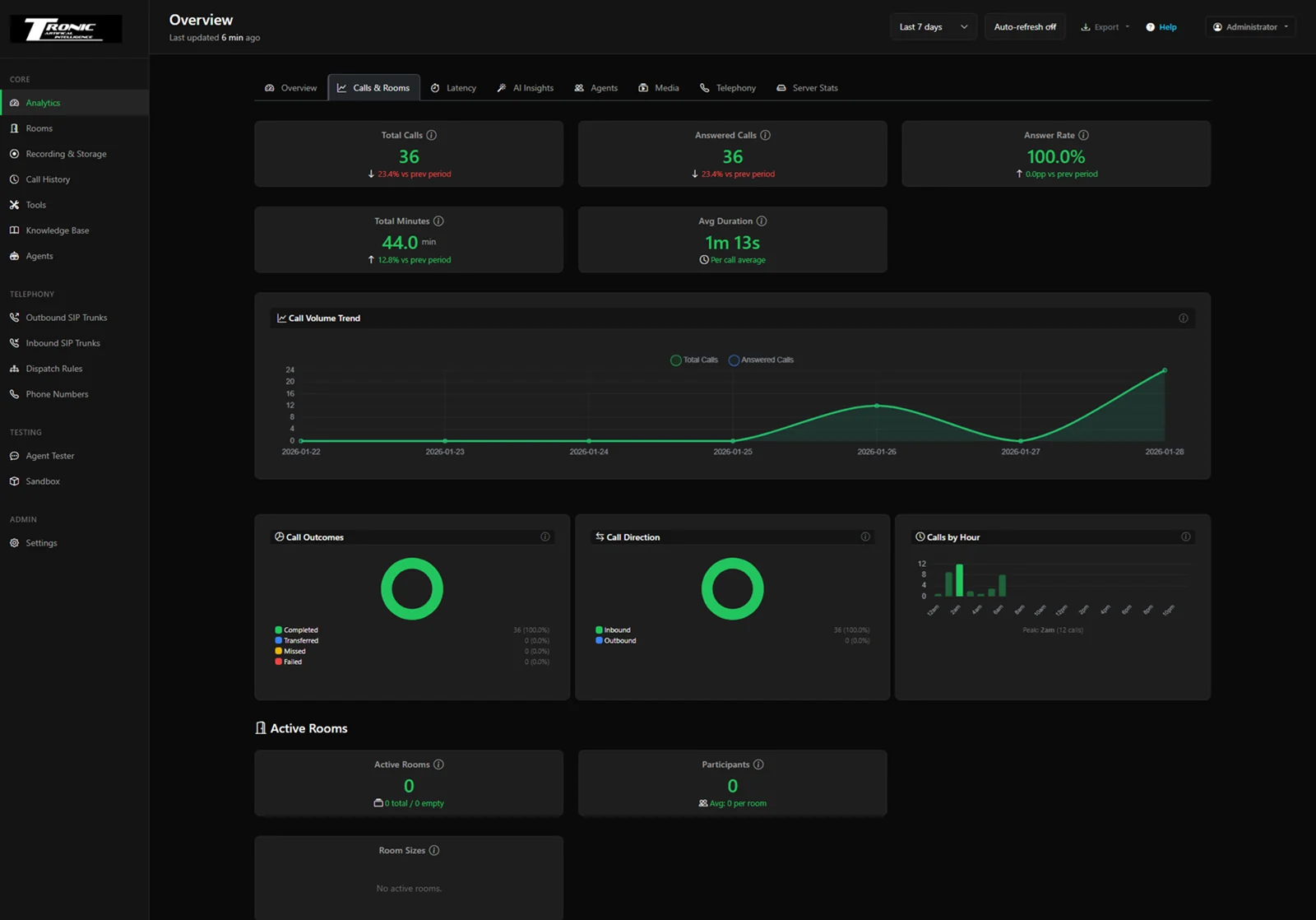
Live performance across every agent and call.
Configure automated reports triggered by calls, analysis, or schedules.
| Name | Trigger | Agents | Recipients | Delivery | Last Sent | Runs | Status |
|---|---|---|---|---|---|---|---|
| Daily call summary | POST-CALL | All agents | 2 recipients | 2026-07-27 08:00 | 125 | Enabled | |
| AI conversation analysis | POST-ANALYSIS | Clinic Reception | 1 recipient | 2026-07-27 07:30 | 88 | Enabled | |
| Weekly performance | WEEKLY @ 17:30 | All agents | 3 recipients | 2026-07-21 17:30 | 18 | Enabled | |
| Missed call alert | POST-CALL | After-Hours | 1 recipient | Webhook | 2026-07-26 22:14 | 42 | Enabled |
| Monthly cost breakdown | MONTHLY | All agents | 2 recipients | 2026-07-01 09:00 | 6 | Disabled |
Every active session, in real time.
| Room | Agent | Participants | Duration | Region | Status |
|---|---|---|---|---|---|
| clinic-reception-8f2a | Melbourne Clinic Reception | 2 | 01:42 | ap-southeast-2 | Active |
| after-hours-11c7 | After-Hours Support | 2 | 00:58 | ap-southeast-2 | Active |
| billing-4d19 | Billing Department | 2 | 03:11 | ap-southeast-2 | Active |
| concierge-77be | Hotel Concierge | 2 | 00:24 | ap-southeast-2 | Connecting |
| reminders-2a05 | Outbound Reminders | 1 | 00:07 | ap-southeast-2 | Ringing |
Full history with cost, health, transcript and AI summary.
| Time | Duration | From | To | Direction | Agent | Cost | Health | Status |
|---|---|---|---|---|---|---|---|---|
| 14:21:08 | 2:14 | +61 3 5550 0142 | +61 3 5550 1000 | Inbound | Melbourne Clinic Reception | A$0.0412 | Healthy | Completed |
| 14:02:51 | 1:38 | +61 4 7701 0288 | +61 3 5550 1000 | Inbound | After-Hours Support | A$0.0298 | Healthy | Completed |
| 13:47:19 | 4:06 | +61 3 5550 0781 | +61 3 5550 1000 | Inbound | Billing Department | A$0.0755 | Healthy | Completed |
| 13:29:44 | 0:52 | +61 3 5550 1000 | +61 4 7701 0913 | Outbound | Outbound Reminders | A$0.0161 | Healthy | Completed |
| 13:05:02 | 3:27 | +61 4 7701 0455 | +61 3 5550 1000 | Inbound | Hotel Concierge | A$0.0634 | Review | Transferred |
| 12:48:36 | 1:11 | +61 3 5550 0326 | +61 3 5550 1000 | Inbound | Melbourne Clinic Reception | A$0.0207 | Healthy | Completed |
View and analyze chatbot sessions.
| Time | Media | From | Duration | Agent | End Reason | Cost | Transcript |
|---|---|---|---|---|---|---|---|
| 2026-07-27 13:11 | Web | Website widget | 39s | Support Chatbot | hangup | A$0.0498 | View |
| 2026-07-27 12:04 | Web | Website widget | 2m 11s | Sales Chatbot | completed | A$0.0612 | View |
| 2026-07-27 10:52 | Web | Website widget | 1m 27s | Support Chatbot | completed | A$0.0355 | View |
| 2026-07-26 17:38 | Web | Website widget | 48s | Bookings Chatbot | hangup | A$0.0281 | View |
Recordings archived to your own cloud storage.
| Filename | Agent | Storage | Size | Date | Actions |
|---|---|---|---|---|---|
| call_2026-07-27_1421_reception.mp3 | Melbourne Clinic Reception | AWS S3 | 2.3 MB | 2026-07-27 14:21 | Play |
| call_2026-07-27_1402_afterhours.mp3 | After-Hours Support | AWS S3 | 1.6 MB | 2026-07-27 14:02 | Play |
| call_2026-07-27_1347_billing.mp3 | Billing Department | AWS S3 | 2.9 MB | 2026-07-27 13:47 | Play |
| call_2026-07-27_1329_reminders.mp3 | Outbound Reminders | Local | 712 KB | 2026-07-27 13:29 | Play |
| call_2026-07-27_1305_concierge.mp3 | Hotel Concierge | AWS S3 | 2.4 MB | 2026-07-27 13:05 | Play |
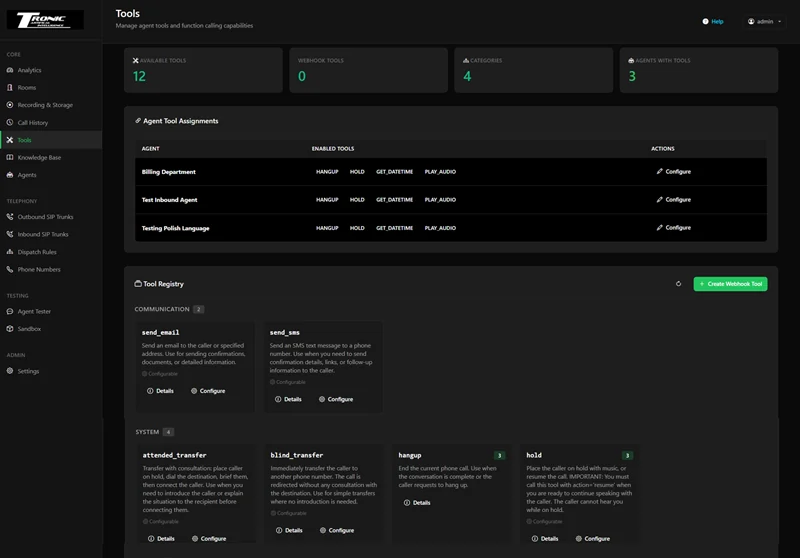
Manage agent tools and function calling capabilities.
| Agent | Type | Enabled Tools | Actions |
|---|---|---|---|
| Melbourne Clinic Reception | Voice | Book appointment, Check availability, Transfer | Configure |
| After-Hours Support | Voice | Take message, Transfer, Send SMS | Configure |
| Billing Department | Voice | Lookup invoice, Take payment link | Configure |
| Hotel Concierge | Voice | Book table, Local recommendations | Configure |
| Support Chatbot | Chat | Knowledge search, Create ticket | Configure |
Manage knowledge base collections and RAG capabilities for your agents.
| Name | Description | Documents | Vectors | Embedding | Created | Actions |
|---|---|---|---|---|---|---|
| Clinic services | Treatments, pricing and hours | 22 | 4,180 | openai/text-embedding-3 | 2026-05-11 | Manage |
| Billing policies | Payment terms and refunds | 14 | 2,940 | openai/text-embedding-3 | 2026-05-19 | Manage |
| Hotel information | Rooms, amenities, local area | 19 | 3,510 | openai/text-embedding-3 | 2026-06-02 | Manage |
| Product FAQ | Common customer questions | 13 | 1,850 | openai/text-embedding-3 | 2026-06-24 | Manage |
Create, configure and run voice agents without touching a CLI.
| Name | Slug | Model | Voice | Status | Health | Actions |
|---|---|---|---|---|---|---|
| Melbourne Clinic Reception | clinic-reception | GPT-4o | Aria (AU) | RUNNING | HEALTHY | Stop |
| After-Hours Support | after-hours | GPT-4o | Nova (AU) | RUNNING | HEALTHY | Stop |
| Billing Department | billing-dept | Claude | Ash (AU) | RUNNING | HEALTHY | Stop |
| Hotel Concierge | hotel-concierge | GPT-4o | Ember (AU) | RUNNING | HEALTHY | Stop |
| Outbound Reminders | outbound-reminders | GPT-4o mini | Aria (AU) | RUNNING | HEALTHY | Stop |
| Sales Qualifier | sales-qualifier | Claude | Nova (AU) | STOPPED | HEALTHY | Start |
Configure AI chat agents for website deployment.
| Name | Status | LLM | Widget Theme | Usage Today | Created | Actions |
|---|---|---|---|---|---|---|
| Support Chatbot | Enabled | anthropic claude-haiku | dark / bottom-right | 4/50 | 2026-07-07 | Edit |
| Sales Chatbot | Enabled | openai gpt-4o-mini | dark / bottom-right | 3/50 | 2026-07-12 | Edit |
| Bookings Chatbot | Disabled | anthropic claude-haiku | light / bottom-left | 0/50 | 2026-07-19 | Edit |
Configuration · SIP Trunks
| Trunk ID | Name | Numbers | Allowed Addresses | Auth Username | Actions |
|---|---|---|---|---|---|
| ST_5FhvKmoQy3Cx | Tronic-SIP-Inbound | +61 3 5550 1000 | 203.0.113.10, 203.0.113.11 | - | Edit |
| ST_9RtqBnwE4Lms | Tronic-SIP-Outbound | +61 3 5550 1001 | 203.0.113.10 | tronic-out | Edit |
| ST_2KdmXpvA7Yqz | Tronic-SIP-Overflow | +61 3 5550 1002 | 203.0.113.12 | tronic-ovf | Edit |
Dispatch Rules Configuration
| Rule ID | Name | Type | Trunk IDs | Room Name | PIN | Agent | Auto-Record |
|---|---|---|---|---|---|---|---|
| SDR_TvhuzisC7Gsw | Clinic inbound | Individual | 1 trunk(s) | - | No PIN | clinic-reception | On |
| SDR_Kp3mQrxD9Bnt | After hours | Individual | 1 trunk(s) | - | No PIN | after-hours | On |
| SDR_Wz8fLcyH2Xkv | Billing direct | Direct | 1 trunk(s) | billing | PIN set | billing-dept | On |
| SDR_Qa5nJdteR6Ypl | Overflow queue | Multi-Line | 2 trunk(s) | - | No PIN | hotel-concierge | Off |
Phone Number Inventory
| Phone Number | Type | Trunk Name | Trunk ID | Actions |
|---|---|---|---|---|
| +61 3 5550 1000 | Inbound | Tronic-SIP-Inbound | ST_5FhvKmoQy3Cx | Edit |
| +61 3 5550 1001 | Outbound | Tronic-SIP-Outbound | ST_9RtqBnwE4Lms | Edit |
| +61 3 5550 1002 | Outbound | Tronic-SIP-Overflow | ST_2KdmXpvA7Yqz | Edit |
Outbound Campaigns
| Campaign | Agent | Trunk | Contacts | Progress | Answered | Status |
|---|---|---|---|---|---|---|
| Appointment reminders | Outbound Reminders | Tronic-SIP-Outbound | 480 | 312 / 480 | 268 | Running |
| Recall - overdue checkups | Clinic Reception | Tronic-SIP-Outbound | 220 | 220 / 220 | 191 | Completed |
| Payment follow-up | Billing Department | Tronic-SIP-Outbound | 96 | 41 / 96 | 33 | Paused |
| Feedback survey | Outbound Reminders | Tronic-SIP-Overflow | 150 | 150 / 150 | 112 | Completed |
Test agents via text or voice conversation.
Test your agents with AI-powered simulated conversations.
| Name | Agent | Tester LLM | Schedule | Last Run | Score | Result |
|---|---|---|---|---|---|---|
| Terse one-word caller | Clinic Reception | GPT-4o | Nightly | 2026-07-27 02:00 | 0.92 | Passed |
| Heavy accent, noisy line | Clinic Reception | GPT-4o | Nightly | 2026-07-27 02:04 | 0.88 | Passed |
| Caller interrupts often | After-Hours Support | Claude | Weekly | 2026-07-26 02:00 | 0.81 | Passed |
| Requests a human | Billing Department | GPT-4o | Nightly | 2026-07-27 02:09 | 0.94 | Passed |
| Ambiguous booking date | Clinic Reception | Claude | Nightly | 2026-07-27 02:12 | 0.64 | Failed |
Replay, score, and improve your agents using their real calls.
| When | Agent | From | Length | |
|---|---|---|---|---|
| 2026-07-27 14:21 | Melbourne Clinic Reception | +61 3 5550 0142 | 2:14 | Select |
| 2026-07-27 14:02 | After-Hours Support | +61 4 7701 0288 | 1:38 | Select |
| 2026-07-27 13:47 | Billing Department | +61 3 5550 0781 | 4:06 | Select |
| 2026-07-27 13:05 | Hotel Concierge | +61 4 7701 0455 | 3:27 | Select |
| Label | Engine | Model | Noise Cancellation | Mode | WER |
|---|---|---|---|---|---|
| Live config | Deepgram | nova-3 | On | Streamed | 4.1% |
| No noise cancellation | Deepgram | nova-3 | Off | Streamed | 7.8% |
| Best possible | Whisper | large-v3 | On | Batch | 3.2% |
Configuration & Integrations
If you are building voice AI in the US, life is easy. For the rest of us — Australia, Europe, Asia — we are fighting physics.
Before your AI even thinks, you have lost 300ms sending audio to an American server. Add the processing time on top and the conversational magic breaks. The caller talks over the agent, the agent talks over the caller, and the demo that felt like magic on a US laptop feels broken on a real phone line.
I needed to host locally but manage globally. So I built the tool I needed — then made it something a non-technical operator could run.
Host the server near your callers and select on-shore models — AWS Bedrock in Sydney, Google Vertex AI in Australia, Azure in your region — and the transit penalty disappears before the model has done any work.
Most voice-AI products rent you an agent on their cloud. This one gives you the whole factory — installed on your server or ours, answering on your numbers, storing your data.
A stateless, ultra-lightweight control panel that gives you full GUI control without the database bloat — and without adding a millisecond to the call loop.
Select geo-located models — Gemini in Sydney, Bedrock in London — to keep processing on-shore and shave 250–300ms of transit off every turn. The stateless architecture adds zero latency to the call loop.
A visual editor for prompts, temperature, voices and models. Hot-swap configuration while agents are running. Live debugging shows real-time transcription and tool usage as the call happens.
Deepgram Flux solves the interruption problem. Turn-complete events understand context, so your agent waits politely when a caller pauses mid-sentence instead of talking over them.
White-label sub-users for clients. They see your logo, their agents and their recordings — nothing else. You keep admin control, plus cost tracking for real-time margin analysis.
Live call monitoring, full history with recordings and transcripts, AI-written summaries, analytics, and an itemised cost breakdown for every single call — so you always know what your agents did and what it cost.
Talk to an agent before it goes live with the built-in tester. Run scripted AI-vs-AI simulations at scale. Then let the Improvement Lab replay real calls against different settings to find what actually works better.
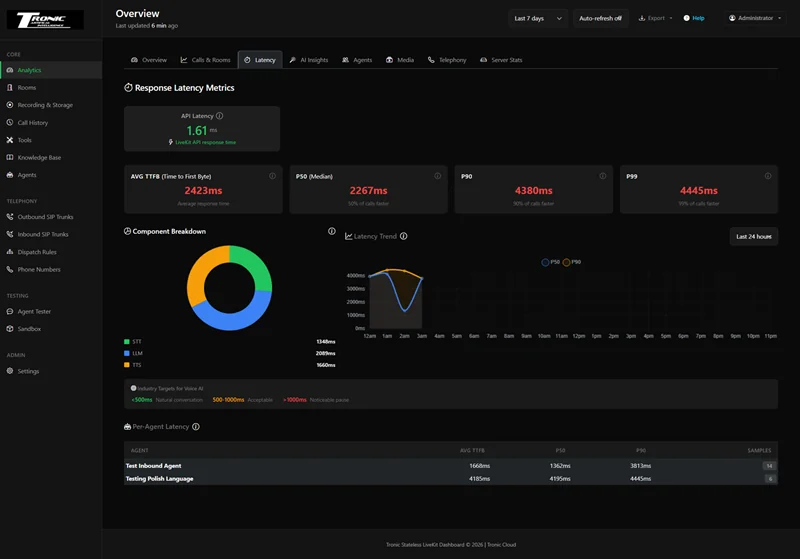
Speed is the metric that decides whether a call feels like a conversation or a phone tree. So the dashboard measures it properly — P50, P90 and P99 response times, broken down by speech-to-text, language model and text-to-speech, with a per-agent table underneath.
When an agent feels sluggish you do not guess. You open the breakdown, see which stage is eating the budget, and change that one provider.
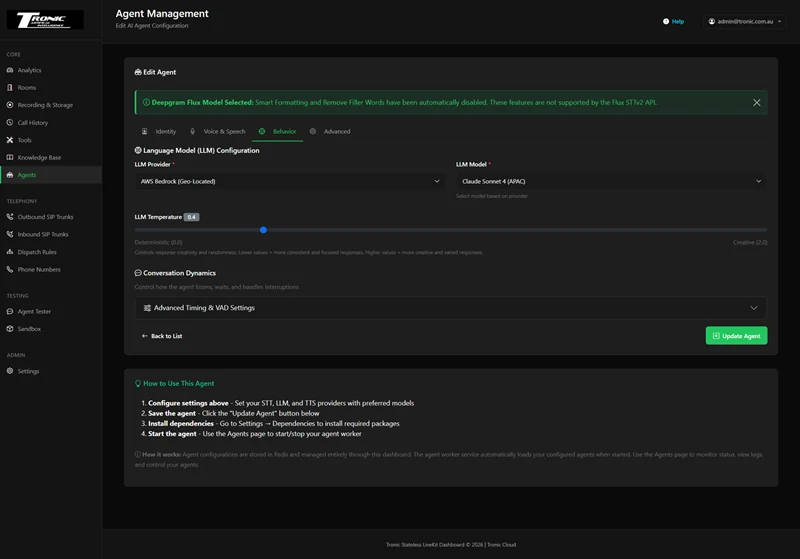
Works with OpenAI, Anthropic, Google, AWS, Azure, xAI, Deepgram, ElevenLabs, Cartesia and more. Mix and match per agent, and swap providers in two clicks when a better or cheaper model appears.
The part that matters outside the US: models are tagged by region. Choosing AWS Bedrock (Geo-Located) with Claude in the APAC region, or Vertex AI in Australia, keeps the processing on-shore instead of round-tripping to Virginia.
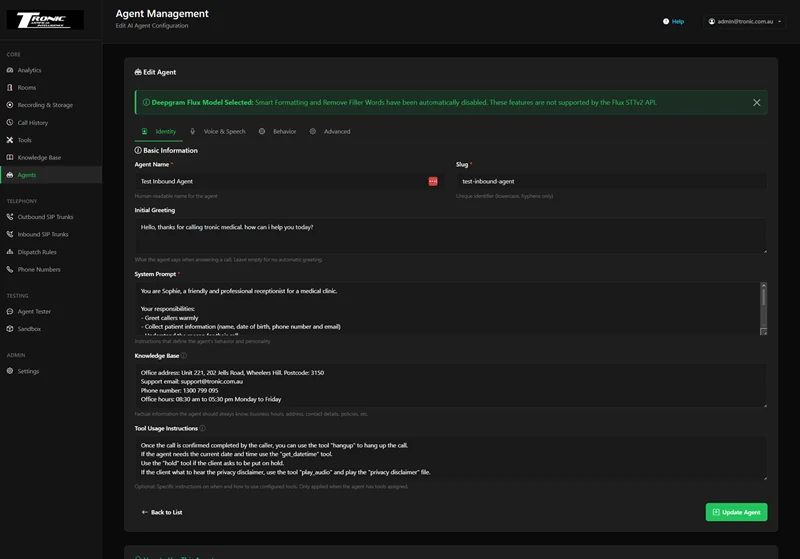
Stop managing agents over SSH. Start, stop, edit and duplicate them with a click. Write the agent’s instructions in plain English, give it a greeting, load your business facts into its knowledge base and tell it which tools it may use.
Change a system prompt while the agent is running and it picks the change up on the next call — no restart, no deployment, no downtime.
Built for agencies running voice AI for other businesses. Create a sub-user for each client and they get their own login showing their agents, their recordings and their analytics — under your logo, not the system backend.
Enter your own LLM, STT and TTS token costs and the dashboard calculates margin in real time, so you know what a client actually costs you before you send the invoice.
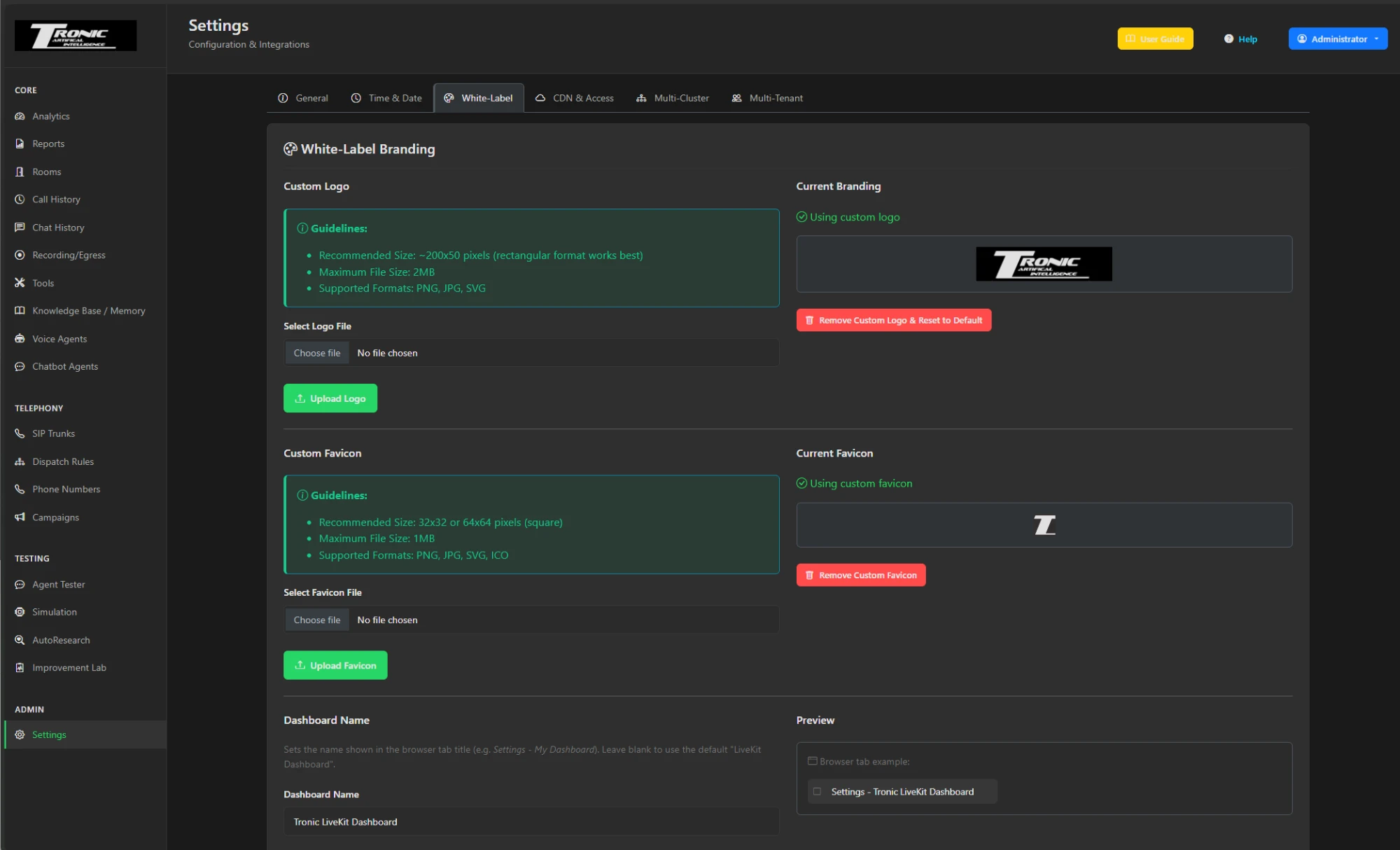
There is a White-Label tab in settings. Upload your logo and favicon, set the dashboard name, and the product stops looking like someone else’s software. Your clients see your brand in the sidebar, in the browser tab, and on every email the system sends.
Nothing in the interface says Tronic or LiveKit unless you want it to — and it is a genuine setting on every paid plan, not a custom build.
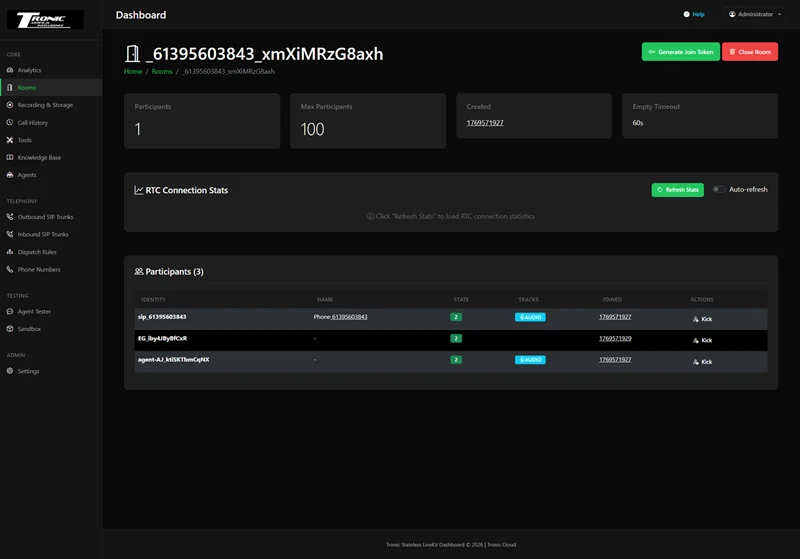
Click into any active room and see it happening: who is connected, which tracks are live, what the caller just said and which tool the agent just called. When something goes wrong you watch it go wrong, instead of reconstructing it afterwards from a log.
Finished calls keep their room visible for several minutes afterwards, so a call that ended badly is still there when someone comes to tell you about it.
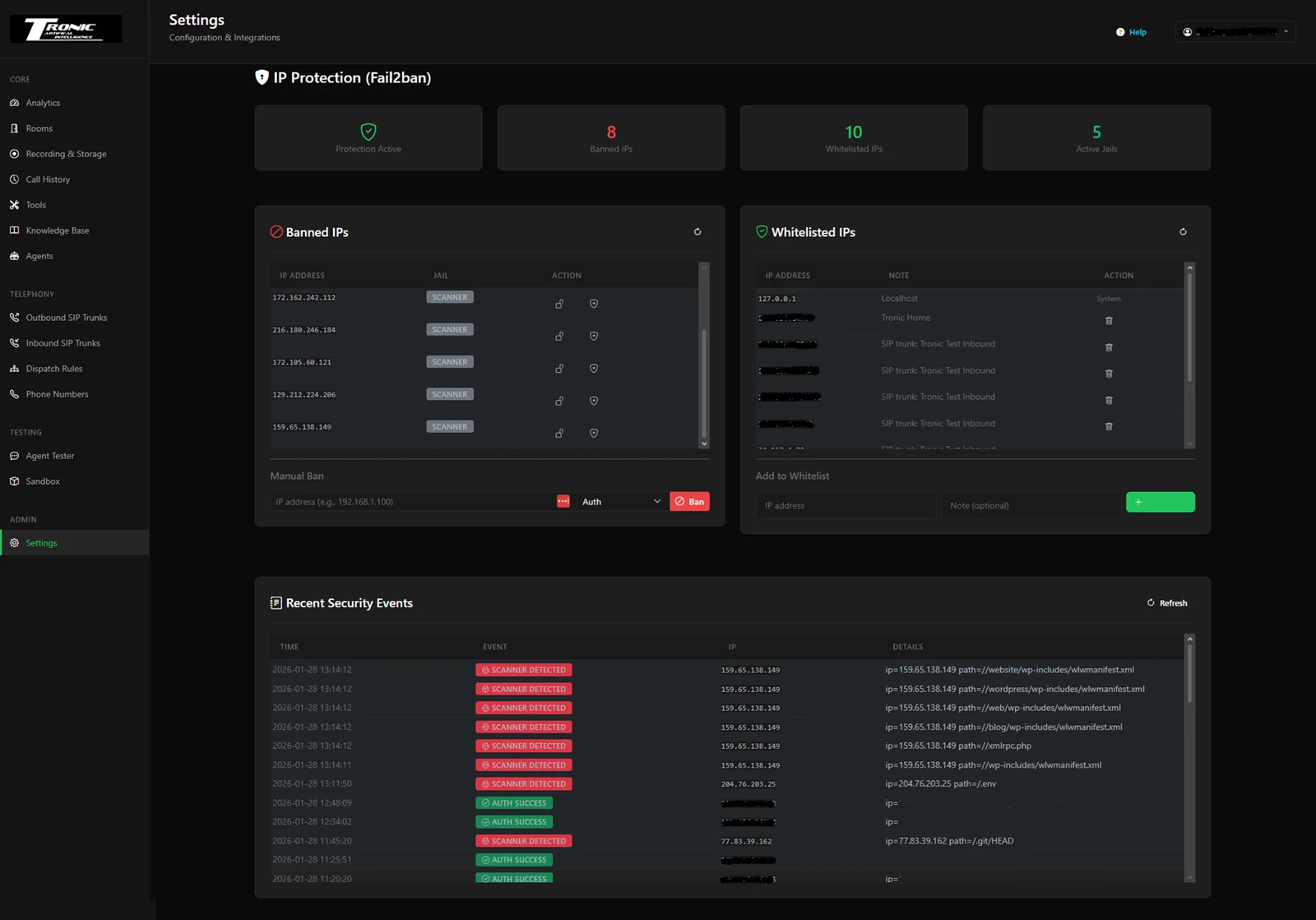
A server on the public internet gets scanned within minutes of going live. The dashboard ships with Fail2ban wired into the interface, so the IPs probing your box for WordPress exploits get banned automatically — and you can see exactly who was banned and why.
Whitelist your office IP with one click so you can never lock yourself out, and keep the software current from the same screen.
Everything below is included in the paid licence — no add-on for analytics, no seat count, no tier that withholds telephony. The free community edition runs the same software with a reduced feature set and a cap of two voice and two chatbot agents.
Create · Configure · Connect knowledge
Telephony · Numbers · Campaigns
Function calling · Webhooks · Automation
Web widget · Text & voice
Visibility · Testing · Reporting
Operations · Security · Scale
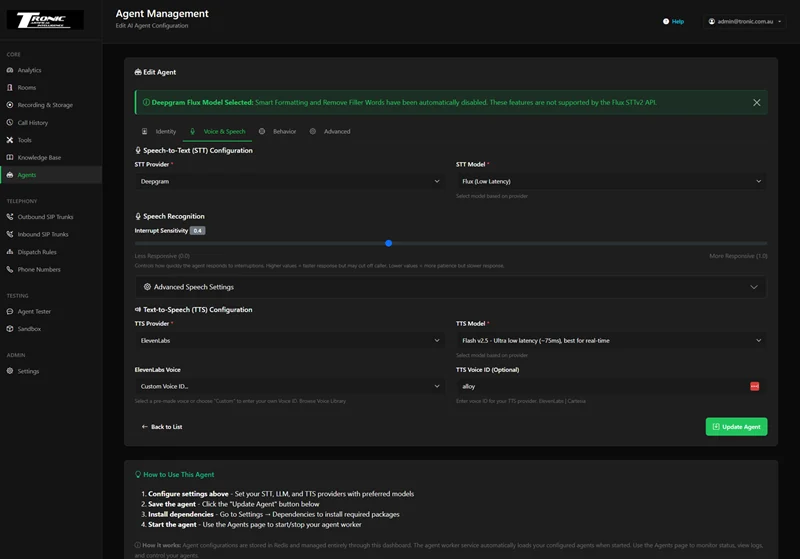
Older agents rely on a silence timer: stop talking for 700ms and the agent assumes you are finished. Real people pause in the middle of an email address. Deepgram Flux understands context instead of counting silence.
Managed voice-AI clouds are excellent products. They are also a rented seat, priced per minute, in someone else’s country.
| Managed voice-AI cloud | LiveKit Dashboard | |
|---|---|---|
| Platform pricing | Per minute, forever, on top of model costs | A flat licence. You pay providers directly at cost |
| Where calls are processed | Their region, usually the US | Your server, or ours in your region |
| Where recordings live | Their storage | Your server or storage bucket — or our AWS server in your region |
| Model choice | Their supported list | Any provider you hold a key for, region-tagged |
| Client access | Their branding, or no client access at all | White-label sub-users under your logo |
| Margin visibility | Their invoice, after the fact | Per-call cost and margin, in real time |
| If they change the pricing | You absorb it or migrate | Self-hosted installs keep running as they are |
| Setup effort | Sign up and go | One install, with setup support included |
Honest version: a managed cloud is faster to start and someone else carries the uptime. Self-hosting wins on cost at volume, on latency outside the US, and on anything where the data cannot leave your control.
There is a free version you can run forever, capped at two voice agents and two chatbot agents. The paid tiers lift the caps and unlock the whole dashboard — all agents, all telephony, all analytics, unlimited call volume. What changes above that is how much of the running you want to hand over.
The free community edition runs on your own server with a reduced feature set and a limit of two voice agents and two chatbot agents — enough to run a real phone line and prove it works. Premium removes the caps and unlocks everything, on your own server. Every paid plan includes full white-labelling. On Agency and VIP we provide both the software and the server, on AWS (Amazon Web Services) in whichever AWS region you choose, so the hosting is included. On every plan you bring your own API keys for the AI models, so model usage is billed by the provider straight to you, at their price — there is no per-minute platform fee on top. All prices are in US dollars (USD), billed monthly, and can be cancelled at any time. Need more simultaneous calls? Talk to us about a bigger server. Paid plans check out securely through Stripe, and your licence key is emailed to you straight after payment. Already a customer? Manage your licence, card, invoices or cancellation in My account. Questions before you buy? Email voiceai@tronic.com.au.
A licence for the dashboard software, installed on your own server (Free and Premium) or on one we host for you (Agency and VIP). There is also a free community edition, capped at two voice agents and two chatbot agents, with a reduced feature set. It is the complete admin panel for LiveKit: agents, SIP telephony, recordings, transcripts, analytics, testing and security — all through a web interface. You are not renting agent minutes from us; you are running the platform yourself.
The community edition is the same software, self-hosted on your own server, with a reduced feature set and a cap of two voice agents and two chatbot agents. That is enough to put a real AI receptionist on a real phone number and see how it performs before paying anything. Upgrading to Premium lifts the caps and unlocks the rest of the dashboard — you keep the same install and the same data.
A Linux server — a modest cloud VM is enough to start — a domain name, and API keys for whichever AI providers you want to use. Installation support is included with the licence, so you do not have to work it out alone. If you would rather not run a server at all, the Agency and VIP tiers run it on our AWS servers for you.
Not after it is installed. Everything — agents, phone lines, monitoring, updates, security, backups — is point and click. There is an in-app user guide with screenshots, health checks that name what is misconfigured in plain English, and one-click updates. No terminal, no code and no IT department for day-to-day operation.
Not from us. You pay a flat monthly licence, and you pay your AI and telephony providers directly at their own rates. Nobody takes a cut of every minute in between. That is the entire economic argument for self-hosting: at volume, the per-minute platform fee is usually larger than the model cost it sits on top of.
Yes, on every paid plan — Premium, Agency and VIP. White-labelling is built in. Create a sub-user for each client and they log in to your domain, under your logo, seeing only their own agents, recordings and analytics. Permissions are granular, so a client can be view-only or restricted to specific agents and phone numbers.
OpenAI, Anthropic, Google, AWS Bedrock, Azure, xAI, Deepgram, ElevenLabs, Cartesia and more, mixed and matched per agent. Regional endpoints are tagged separately, so you can deliberately keep processing on-shore — Bedrock in Sydney, Vertex AI in Australia, Azure in your region — instead of round-tripping to the US.
It depends on the plan. On Free and Premium it lives on your server — locally, or in your own S3 or Google Cloud Storage bucket — and nothing is stored with us. On Agency and VIP it lives on the AWS server we run for you, in the AWS region you choose. Either way it stays in the region you pick. For healthcare, legal and finance work, that is usually the difference between a project that can proceed and one that cannot.
They are two different products from the same team. Tronic Cloud Voice AI is a hosted, pay-as-you-go platform — you sign up, get an Australian number and build agents on our infrastructure. LiveKit Dashboard is the self-hosted option: you own and run the whole platform, brand it as your own, and create accounts for your own clients. Hosted is faster to start; self-hosted is what you want when the infrastructure, the data or the margin has to be yours.
Through the community, which is free to join and where setup questions get answered, and directly over WhatsApp on the Premium, Agency and VIP tiers. Installation support is included with the licence. You can also email voiceai@tronic.com.au at any time.
Do not settle for demos that only work on a US laptop. Build infrastructure that holds up on real networks, for real clients, at real volume — and keep the margin while you do it.